Adobe Creative Cloud Pro Plus
Adobe Creative Cloud Pro Plus
You are receiving access to Adobe Creative Cloud Pro Plus for Education, Adobe’s expanded Creative Cloud offering for higher education. The new license builds on the Creative Cloud applications you may already use while adding expanded generative AI, document intelligence, and Adobe Stock capabilities. This guide provides an overview of what is included with your new license.
What's Different?
| Capability | Previous Creative Cloud All Apps EDU | Creative Cloud Pro Plus |
|---|---|---|
| Standard Firefly AI | 500 credits/month | Unlimited standard generations |
| Premium Firefly AI | -- | 1,000 premium credits/month |
| Acrobat AI Assistant | Very limited access | Included |
| PDF Spaces | Very limited access | Included |
| Adobe Stock | Express Premium collection | Adobe Stock standard assets |
| Advanced AI video/audio capabilities | Limited/not included | Included through premium Firefly capabilities |
How do I know I have Adobe Creative Cloud Pro Plus?
Open Adobe Creative Cloud and click on your profile icon. If your account has been upgraded you will see new credit limits.
| OLD LICENSE | NEW LICENSE |
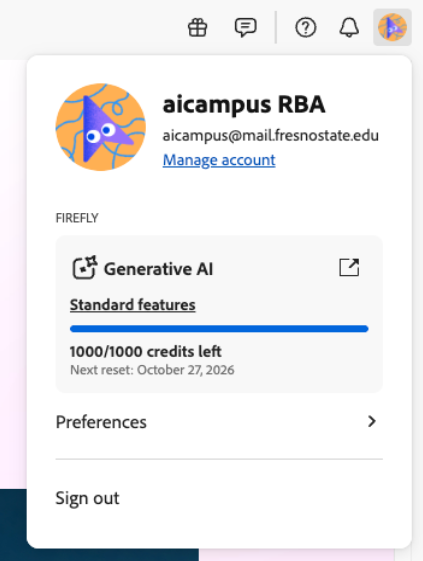 |
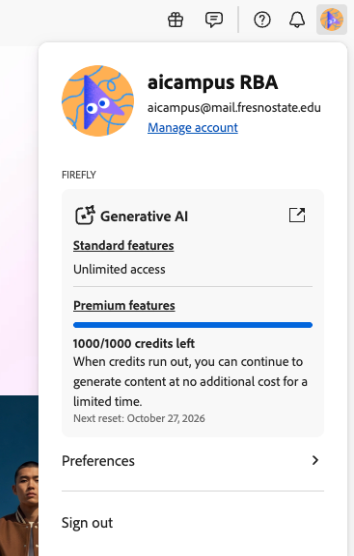 |
What's New?
NEW: Expanded Adobe Firefly Generative AI
Creative Cloud Pro Plus provides expanded access to Adobe Firefly generative AI, including both standard and premium generative AI features.
Standard Generative AI
You have unlimited access to standard generations using supported Adobe Firefly models. Depending on the Adobe application, these capabilities can include tools such as:
- Generative Fill
- Generative Expand
- Generate Image
- Generate Background
- Generate Similar
- AI-assisted image editing and manipulation
Many of these capabilities are integrated directly into applications such as Photoshop and Illustrator, allowing generative AI to become part of your existing creative workflow.
Premium Generative AI
Your license also includes 1,000 premium generative credits per month. Premium features are generally more computationally intensive and can include capabilities such as:
- AI-generated video
- AI-generated audio
- Video and audio translation
- Advanced generative video editing
- Premium Firefly models
- Supported third-party AI models available through Adobe
Credit usage varies depending on the feature, model, output, and complexity of the generation.
Understanding Your Generative AI Credits
Your Pro Plus license includes:
- Unlimited standard Firefly generations
- 1,000 premium generative credits per user, per month
Standard and premium features consume credits differently. More computationally intensive activities—particularly video, audio, and some advanced or third-party AI models—may consume more credits per generation. Your premium credit allocation refreshes monthly. If you regularly use generative AI, we encourage you to pay attention to which workflows provide the most value and how quickly different activities consume your monthly premium credits.
Learn more about Adobe Generative Credits Learn about Standard vs Premium AI Features
NEW: Adobe Acrobat Studio
Adobe Acrobat Studio brings together Adobe’s PDF, AI, and content creation tools in one integrated experience. It combines Acrobat Pro, Acrobat AI Assistant, PDF Spaces, and Adobe Express Premium to help you work with information from initial research and analysis through content creation and sharing. With Acrobat Studio, you can:
- Create, edit, organize, and manage PDFs with the full capabilities of Acrobat Pro.
- Ask questions and get insights from your documents using Acrobat AI Assistant, with responses linked back to source material through
- citations.
- Work across multiple documents and sources using PDF Spaces to bring information together into an AI-powered workspace.
- Create presentations from your source materials, using AI to develop an initial outline and presentation that you can continue editing.
- Generate podcast-style audio overviews from documents and other source materials.
- Create visual content with Adobe Express Premium, including presentations, infographics, flyers, and other communications.
- Collaborate and share PDF Spaces, allowing others to interact with the same collection of information and AI-powered workspace.
Acrobat Studio brings these capabilities together so you can analyze, understand, collaborate, and create from your information in one environment. For example, you could bring several reports, presentations, and webpages into a PDF Space, use AI Assistant to identify key themes and insights, and then turn that information into a presentation using Adobe Express.
| Adobe Acrobat Standard | Adobe Acrobat Pro | Adobe Acrobat Studio | |
|---|---|---|---|
| Create, collaborate on, edit, sign PDFs and more with Adobe Acrobat | ✅ | ✅ | ✅ |
|
Standard Adobe Firefly generative AI features |
25 credits per user/month | 25 credits per user/month | Combined with standard Firefly credits |
|
Premium Adobe Firefly generative AI features |
❌ | ❌ | 250 credits per use/month |
|
Adobe Acrobat AI Assistant and PDF Spaces |
5 lifetime credits | 5 lifetime credits | ✅ |
View the Acrobat Studio Information Sheet Watch the Acrobat Studio Explainer Video
NEW: PDF Spaces
PDF Spaces provides an AI-powered workspace for working across documents and other supported information. PDF Spaces can help you bring information together, interact with the content using AI, and develop insights without having to review each source independently.
Potential uses include:
- Researching a topic across multiple documents
- Comparing information from different sources
- Summarizing collections of material
- Organizing information around a project
- Asking questions across your source material
- Collaborating around document-based research and information
Think of PDF Spaces as a workspace for moving from simply reading documents to working with the information contained in them.
NEW: Acrobat AI Assistant
AI Assistant for Adobe Acrobat is a conversational feature that lets you interact with your documents to get quick answers to questions based on the PDF content in a comprehensive and informative way. It links to the text and data table sources within your document and also suggests follow-up questions based on the primary question.
Benefits include:
- Centralize up to 100 files in one workspace: Organize PDFs, Word documents, slides, spreadsheets, transcripts, and web content—in a single view.
- Al-powered insights across your documents: Get answers using specialized assistants. Instantly surface key data, compare content, and summarize long documents-without opening each file.
- Verifiable insights: Get high-quality responses with clickable citations that go to precise spots in the source documents.
- Collaborate in context, not over email: Share entire Spaces with all source documents in their original format, plus Al-powered insights and notes, and a context-aware Al assistant.
Get Started with Acrobat AI Assistant Learn more about Acrobat AI Assistant
NEW: Adobe Stock Standard Assets
Creative Cloud Pro Plus also provides access to Adobe Stock standard assets. Adobe Stock provides professionally created content that can be incorporated into your creative work, including supported:
- Photos
- Illustrations
- Graphics
- Design assets
This expands the stock content available beyond the Adobe Stock collection traditionally available through Adobe Express Premium.